For a small job shop, the best CAM software is the one that runs your machine reliably, handles the geometry you cut, and does not require a dedicated programmer to operate. Evaluate post-processor quality, CAD integration, and axis coverage against your actual job mix, not a vendor’s feature checklist.
Why CAM Software Decisions Hit Differently in Small Shops
A large manufacturer can absorb a six-month onboarding curve and a specialist programmer. A small shop cannot. Every hour spent fighting the software is an hour not spent cutting parts.
The criteria that matter here are not the same as enterprise CAM buying decisions. Post-processor reliability matters more than a deep feature library. Ease of use per programmer matters more than team-level collaboration tools. Licensing cost per seat matters more than volume discounts. Getting to first cut within a day of installation matters more than theoretical capability at the top configuration tier.
What to Evaluate in CAM Software for Machine Shops
Post-processor quality and machine compatibility
The post-processor converts toolpaths into G-code your specific controller reads. Strong toolpath logic with a poorly written post-processor means manual G-code editing before the job runs. For a small shop, that editing step is either the programmer’s time or a job that ships late.
Before evaluating any CAM platform, confirm it has a tested post-processor for your machine and controller. Not a generic post that should work — a post that has been run on your controller and handles thread milling, helical entry, and tool change sequences without correction.
CAD integration or standalone CAD inclusion
Small shops typically receive parts as files: STEP, IGES, DXF, or native CAD formats. If the CAM platform requires a separate CAD license to open and repair incoming models, that is an additional cost and an additional application in the workflow.
Two practical options: CAM software that runs inside a CAD environment the shop already uses, or a standalone CAD/CAM package that includes CAD at no extra cost. Both eliminate the re-import cycle that erodes programming time on jobs with design changes.
Axis coverage matched to your machine
Paying for simultaneous 5-axis capability on a 3-axis machine is overhead with no return. Running a 4-axis machine on a platform that does not support indexed rotational work means programming around the machine rather than using it.
The right configuration covers what the shop runs today with a clear upgrade path if the work expands. Platforms that require a full software change at each capability tier create a retraining cost the shop absorbs entirely.
Onboarding time and support access
For a one- or two-person programming operation, the learning curve is billable time. CAM software with structured self-paced training, clear documentation, and responsive technical support reduces that cost directly. A support queue with multi-day response times is a risk on every new job type.
How Small Job Shops Use CAM Software in Practice
MK Fabrication in Elko, Nevada is a full-service fabrication shop running custom tooling work across mining equipment, heavy equipment, and general projects, with mobile on-site capability. A recent job involved mold cores for industrial fencing: prismatic parts with five identical feature sets spaced 15 inches apart, each requiring 3-axis pocketing, profiling, and a Between 2 Curves finishing pass on a sloped contour surface.
Using RhinoCAM, Michael Jenkins and master machinist R. Brooks Bench programmed the part with XY instancing, defining one set of toolpath operations and replicating it across all five positions from a single folder in the machining job. One post produced clean G-code for all five feature positions. For a shop that manufactures its own tooling to make client jobs faster and more cost-effective, that kind of programming efficiency is not optional.
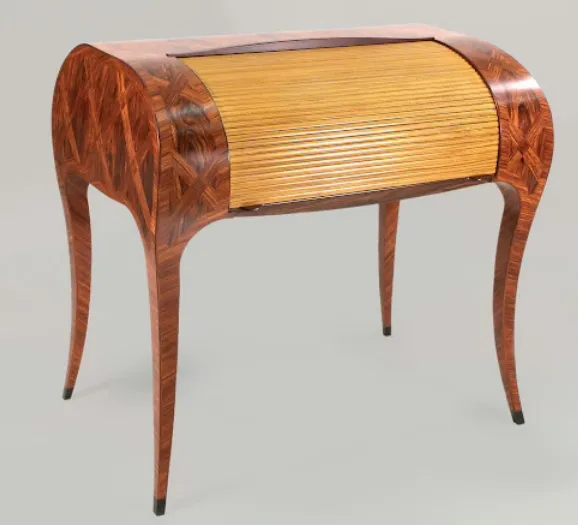
Curtis Erpelding of Erpelding Furniture in Port Orchard, Washington built his own 3-axis CNC router in 2004 and ran a different CAM platform for 15 years before switching to VisualCAD/CAM in 2019. His production includes a line of Bentwood stackable chairs and tables alongside commissioned furniture. The switch came down to functionality at the operations level and an interface that did not demand relearning every time a new job type came in. After 40 years of woodworking, the software’s job is to cut the part, not teach the craft.
Here is a great example of the fine quality and craftsmanship of a Curtis Erpelding piece.
Affordable CAM Software Options for Small Machine Shops
Free 3-axis entry
FreeMILL from MecSoft is permanently free: no time limit, no line-of-code restriction, no license required. It includes VisualCAD for geometry creation and supports standard post-processors for most common CNC mills and routers. For a shop evaluating CNC for the first time, or programming a second machine that only runs flat and prismatic work, FreeMILL covers the requirement at zero software cost.
Scalable standalone CAD/CAM
VisualCAD/CAM is a standalone package with CAD and CAM in one application, no separate CAD license required. Configurations run from Express (2½-axis and 3-axis) through Premium (full simultaneous 5-axis). Each tier adds capability without a platform change, so a shop that starts on Standard and adds a 4-axis rotary table upgrades to Expert without rebuilding its workflow or retraining on a new interface.
Integrated CAD/CAM for Rhino users
For shops already working in Rhinoceros, RhinoCAM runs as a plugin directly inside Rhino. Design geometry and machining operations share the same file. Toolpath associativity means design changes update machining operations without re-importing geometry.
The full MecSoft product lineup, including RhinoCAM, VisualCAD/CAM, and FreeMILL runs on the same CAM engine. Post-processors, toolpath strategies, and simulation behavior are consistent across products. A shop that starts on VisualCAD/CAM Standard and moves to RhinoCAM Professional is not relearning CAM logic. It is adding capability within a familiar framework.
CAM Software Configuration Comparison for Small Machine Shops
| Configuration | Axis Coverage | Best Fit | CAD Included |
| FreeMILL | 3-axis | First CNC, simple production, no software budget | Yes (VisualCAD) |
| VisualCAD/CAM Express | 2½-axis, 3-axis | Makers, educators, entry-level shops | Yes |
| VisualCAD/CAM Standard | 2½-axis, 3-axis, drilling | Job shops, prototyping, general machining | Yes |
| VisualCAD/CAM Expert | 4-axis indexed and continuous | Shops adding rotary capability | Yes |
| VisualCAD/CAM Professional | Advanced 3-axis, 5-axis indexed | Mold, die, tooling, complex 3D work | Yes |
| RhinoCAM Standard through Professional | 3-axis through 5-axis indexed | Rhino users, design-driven shops | Requires Rhino |
Questions to Ask Before Committing to a CAM Platform
Does the platform have a tested post-processor for your machine and controller, not a generic approximation?
Can you open and repair incoming part files, STEP, IGES, DXF, without a separate application?
Does the configuration you are buying cover the axis capability you actually use, with a clear upgrade path if the work changes?
What does onboarding look like for a programmer with no prior experience on this platform: structured video training, documentation, or live support?
Is the licensing model perpetual ownership or subscription? For a small shop, paying monthly regardless of job volume is a real cash flow variable.
Can you run the full software on your own geometry before buying? A demo that restricts toolpath output or G-code length is not a real evaluation.
How to Get Started Evaluating CAM Software for Your Shop
Run your own parts through the software on your own post-processor before any purchase decision. FreeMILL is available at no cost with no time limit. VisualCAD/CAM and RhinoCAM are both available as fully functional demos with no feature restrictions, so the evaluation reflects actual production conditions.
For shops uncertain which configuration fits, the axis count and operation types on the last ten jobs is a reliable starting point. The configuration that covers those jobs cleanly, with room for the next tier of complexity, is the right entry point.